
Capture text from almost any on-screen content
Press ⌘⇧2 and drag over text in an image, video, PDF, website, or app. PixelRead uses Apple Vision to turn the selected region into editable text immediately.

PixelRead is a Mac OCR utility that captures text from screen regions and turns it into editable text, with on-device translation and Apple Intelligence actions.
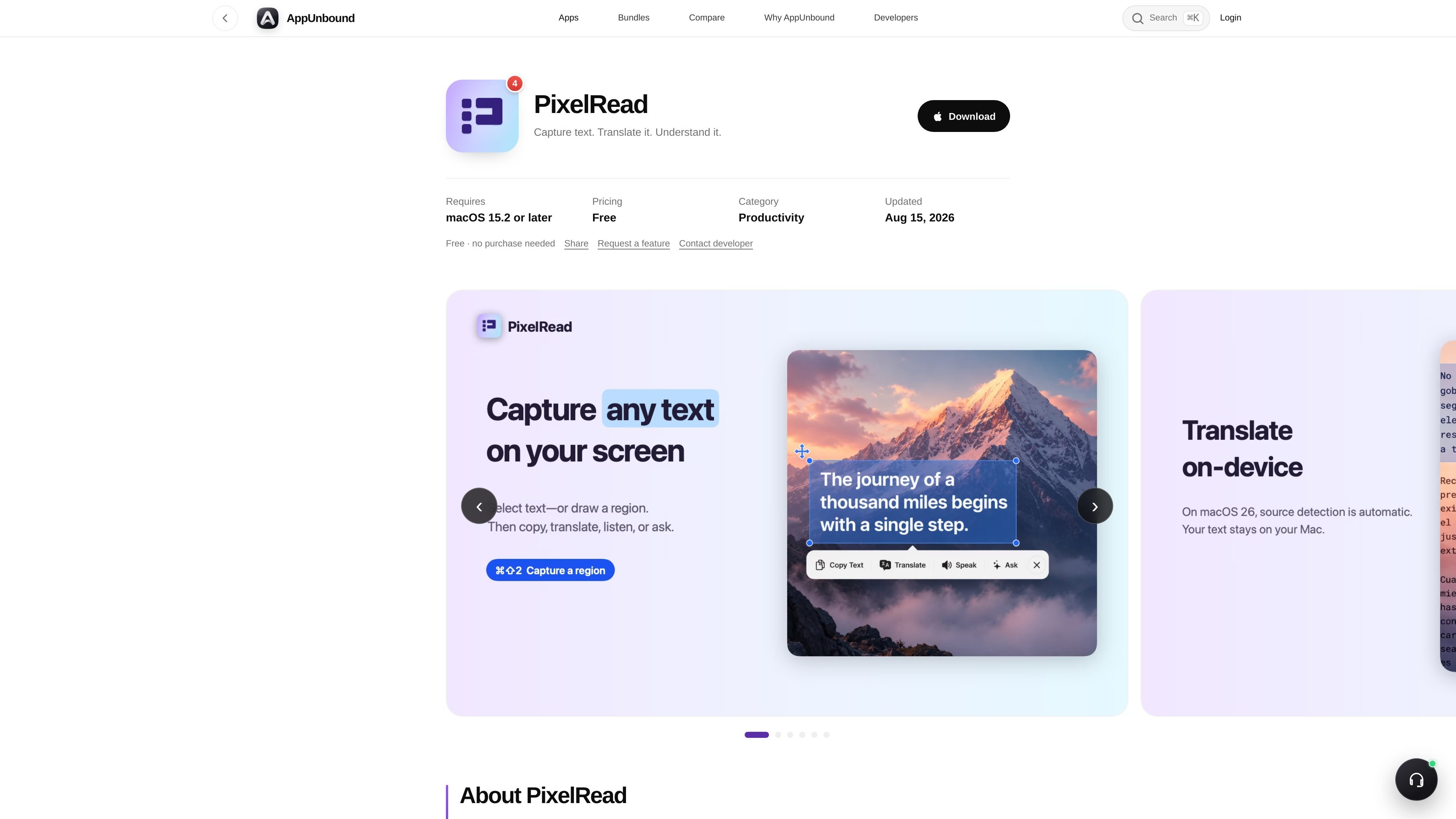
PixelRead is a Mac OCR utility that captures text from regions of the screen and turns it into usable text right away. It works with screenshots, images, videos, PDFs, websites, and app interfaces, using the ⌘⇧2 shortcut to select a region and recognize the text with Apple Vision.
After capture, PixelRead can copy the text, translate it on-device, or—on a supported Mac with Apple Intelligence—summarize, rewrite, extract details, and answer questions grounded in the recognized text. The app lives in the menu bar and is designed to keep the workflow in one place instead of moving text into another app.
Press ⌘⇧2 and drag over text in an image, video, PDF, website, or app. PixelRead uses Apple Vision to turn the selected region into editable text immediately.
Copy the recognized text directly to the clipboard, or open the same action bar on text that is already selected in another app.
Translate captured text beside the original using Apple’s on-device translation framework, which keeps the text on your Mac.
On a supported Mac with macOS 26 and Apple Intelligence, turn captured text into a concise summary without sending it to a server.
Ask a focused question, rewrite text, or extract names, dates, numbers, links, decisions, and action items from the recognized text.
Read original, translated, or generated text aloud and reopen the 12 most recent captures with their recognized text.
Select text in a screenshot, image, PDF, or app window and turn it into editable text without retyping.
Capture text in another language, then translate it beside the original before copying or reviewing it.
Turn a long passage into bullet-point notes, or ask for a focused answer based only on the text you captured.
Polish copied text, pull out names, dates, numbers, links, decisions, or action items, and then paste the result into your workflow.
Open the same action bar on text that is already selectable in another app when you want OCR-like actions without capturing a region first.
PixelRead runs on a Mac with macOS 15.2 or later. It is listed as Universal, so it works on both Apple Silicon and Intel Macs.
The product page says PixelRead is free: no purchase is needed, and the app can be downloaded without checkout, a key, or an account.
Yes. PixelRead can copy recognized text, translate it on-device beside the original, summarize text on supported Macs with Apple Intelligence, rewrite text, extract details, answer questions, and read text aloud.
The page says PixelRead is notarized by Apple and hand-reviewed by AppUnbound before it reaches the store.
Yes. The page says PixelRead can act on text already selected in another app, so you do not always need to capture a fresh screenshot region first.

Goldfish is an AI memory app for macOS that helps you reply, write, summarize, and continue with context already on your Mac. It stores memory locally and writes in your tone.

Lasso is an ecommerce product data platform for enriching catalog records, processing supplier files, generating product content, and tracking competitors. It includes a web app, REST API, SDK, and MCP server.

ArtDeck is a visual reference board app for iPhone, iPad, and Mac. Collect mixed references on one canvas and study them with ToolBox lenses. Offline, optional iCloud sync, one-time purchase.

Struere turns spreadsheet data into structured operational software with dashboards, alerts, and automations for teams replacing manual spreadsheet workflows.

An AI-powered tool that summarizes PDF documents quickly and efficiently, providing clear insights and allowing users to interact with the content.

Tactiq is an AI note taker for Google Meet, Zoom, and Microsoft Teams that transcribes meetings live into summaries, action items, and follow-up outputs.